
Payload Ransomware Overview
Payload is an emerging ransomware group that was first identified in February 2026 and primarily targets mid-to-large-sized organizations across sectors such as healthcare, telecommunications, finance, and logistics. The group operates on a global scale, with a noticeable concentration of activity across Middle East and Asia.
Despite its recent emergence, Payload has already claimed more than 40 victims within a relatively short period, indicating rapid operational growth and suggesting a well-organized and coordinated operation.
Technical Analysis
Payload is a cross-platform ransomware family with both Windows and Linux variants. In this blog, we will primarily focus on the Windows variant and its behavior in detail.
Command-line Arguments
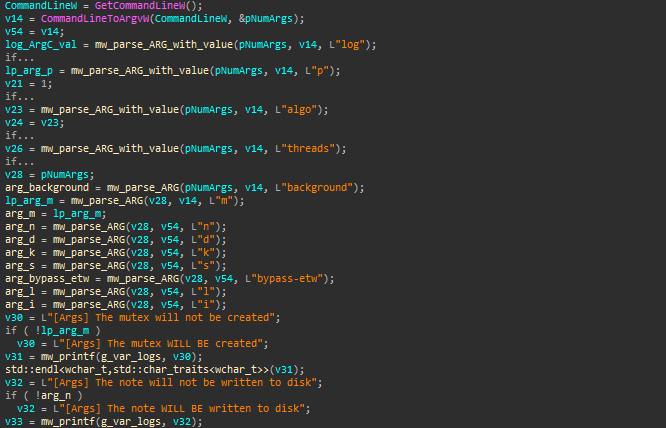
Payload provides extensive support for command-line arguments, suggesting it can be operated manually or remotely. It appears to work as an operator-driven ransomware executable rather than a simple one-click . This design allows operators to selectively enable or disable features based on the target environment or operational objectives .
| Flag | Effect when present | Default behavior |
|---|---|---|
| `–background` | Runs encryption in the background (no console window); does NOT re-spawn itself | N/A |
| `-m` | Skips mutex creation/check (allows multiple instances) | Mutex is created to enforce single instance |
| `-n` | Does NOT write the ransom note to disk | Ransom note is written |
| `-d` | Disables self-deletion | Self-deletion is executed after run |
| `-k` | Does NOT kill processes or stop services | Target processes/services are terminated |
| `-s` | Skips network share enumeration (only local drives targeted) | Network shares are also enumerated and encrypted |
| `-l` | Wipes all Windows Event Logs after encryption (anti-forensics) | Event logs are left unchanged |
| `-i` | Ignores filename filters (may re-encrypt its own files like notes or payload artifacts) | Filename filters are enforced to avoid its files and system files |
| `–bypass-etw` | Patches ETW functions in `ntdll` to disable logging | ETW remains functional |
| `–algo` | Forces a specific ChaCha20 implementation (AVX2 or SSE2 optimized) | Algorithm path is auto-detected based on CPU |
| `–threads N` | Sets number of worker threads for encryption | Defaults to number of CPU cores |
| `-p <path>` | Encrypts only the specified path | All drives are enumerated and encrypted |
| `–log <path>` | Overrides default log file location | Logs written to `C:\payload.log` |
Execution Modes
Payload supports two execution modes.If the background flag is already set, the malware runs silently in the background and continues directly to its main stages without showing any visible activity.
However, if the flag is not provided, the malware does not stop or limit its behavior. Instead, it prepares a new command line and launches a hidden copy of itself with the –background argument, then exits the current process. In this way, the original instance only acts as a launcher, while the actual ransomware execution continues in a hidden background process .
Pre-Encryption
Before starting the encryption phase, Payload performs a pre-encryption setup to prepare the system and remove recovery options. This stage ensures that targeted files are fully accessible and that the victim’s ability to recover data is significantly reduced.
Mutex Creation
To prevent multiple instances from running simultaneously, the malware creates a mutex named “MakeAmericaGreatAgain“. If the mutex already exists, the program assumes another instance is active and terminates.
Disabling Event Tracing
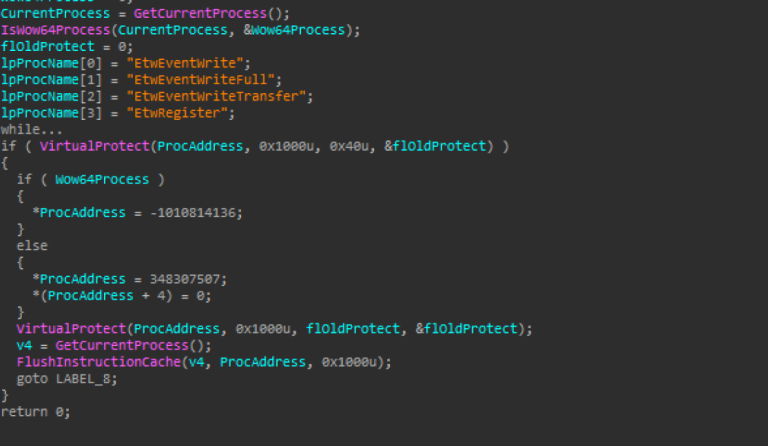
Payload disables Event Tracing for Windows (ETW), a Windows logging mechanism used by security tools to monitor process activity.
It first locates key ETW functions inside ntdll.dll, then temporarily changes their memory protection to allow modification. After that, it patches the start of these functions in memory with a small instruction that forces them to immediately return, effectively disabling logging behavior.
Finally, it restores the original memory permissions and refreshes the instruction cache to apply the changes.
Clearing Event Logs
Payload can perform an anti-forensics step to remove traces of its activity from the system. It starts enumerating all available event log channels using EvtOpenChannelEnum and EvtNextChannelPath. For each log channel, it calls EvtClearLog to delete its contents.
After finishing, it closes the handle and unloads the related library. By clearing all event logs, the malware removes important records such as execution history.

Deleting Shadow Copies
Payload also runs a preparation step before encryption to block any easy way to recover files. It first checks if it is running in a 32-bit process on a 64-bit system (WOW64), and temporarily disables file system redirection so it can access the real system tools instead of redirected ones. Then it runs a command vssadmin.exe delete shadows /all /quiet, which deletes all Volume Shadow Copies on the system. After that, it restores the normal system state.
By removing these backups before encryption starts, the malware makes it much harder for the victim to restore their files.

Terminating Targeted Services
Payload enumerates a hardcoded list of services and attempts to terminate them prior to initiating the encryption routine. For each service, it opens it using OpenServiceA and checks its current state with QueryServiceStatusEx. If the service is not already stopped or in the process of stopping, the malware terminates it.
Before stopping the main service, the malware stops dependent services first and waits until they finish or a timeout occurs, then continues execution and closes all service handles.
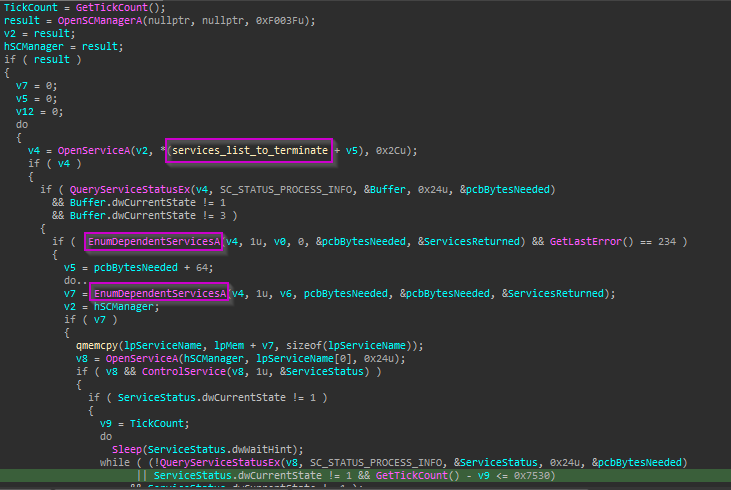
The following hardcoded services were identified within the malware sample and are likely terminated during execution:
- VSS and Storage Services:
vss, VSNAPVSS, PDVFSService - SQL and Database-Related Services:
sql, svc$ - Backup and Recovery Solutions:
backup, YooBackup, YooIT, veeam, VeeamTransportSvc, VeeamDeploymentService, VeeamNFSSvc, BackupExecVSSProvider, BackupExecAgentAccelerator, BackupExecAgentBrowser, BackupExecDiveciMediaService, BackupExecJobEngine, BackupExecManagementService, BackupExecRPCService, AcrSch2Svc, AcronisAgent, CASAD2DWebSvc, CAARCUpdateSvc, GxVss, GxBlr, GxFWD, GxCVD, GxCIMgr - Security and Endpoint Protection Services:
sophos, DefWatch, ccEvtMgr, ccSetMgr, SavRoam, RTVscan, memtas, mepocs, zhudongfangyu - Business and Enterprise Application Services:
QBFCService, QBIDPService, Intuit.QuickBooks.FCS, QBCFMonitorService, stc_raw_agent
Terminating Processes
Malware calls CreateToolhelp32Snapshot to retrieve a snapshot of all processes and threads in the system. It then iterates through the process list using Process32FirstW and Process32NextW to identify active processes on the system.
For each process, Payload compares the executable name against a hardcoded list of targeted processes. If a match is found, the malware obtains a handle to the process using OpenProcess and forcibly terminates it using TerminateProcess.
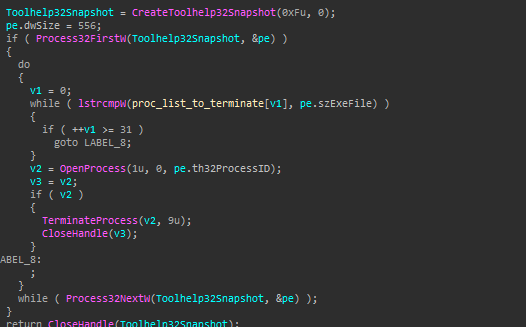
The following processes are hardcoded within the malware and are targeted for termination:
- Database and Enterprise Services:
sql.exe, oracle.exe, ocssd.exe, dbsnmp.exe, isqlplussvc.exe, ocautoupds.exe, dbeng50.exe, sqbcoreservice.exe, ocomm.exe, encsvc.exe, agntsvc.exe, synctime.exe, xfssvccon.exe - Backup and Synchronization Tools:
mydesktopservice.exe, mydesktopqos.exe - Office and Productivity Applications:
excel.exe, infopath.exe, msaccess.exe, mspub.exe, onenote.exe, outlook.exe, powerpnt.exe, visio.exe, winword.exe, wordpad.exe, notepad.exe - Communication and Email Clients:
thunderbird.exe, tbirdconfig.exe, thebat.exe - Gaming and Miscellaneous Applications:
steam.exe
Self-Deletion via NTFS
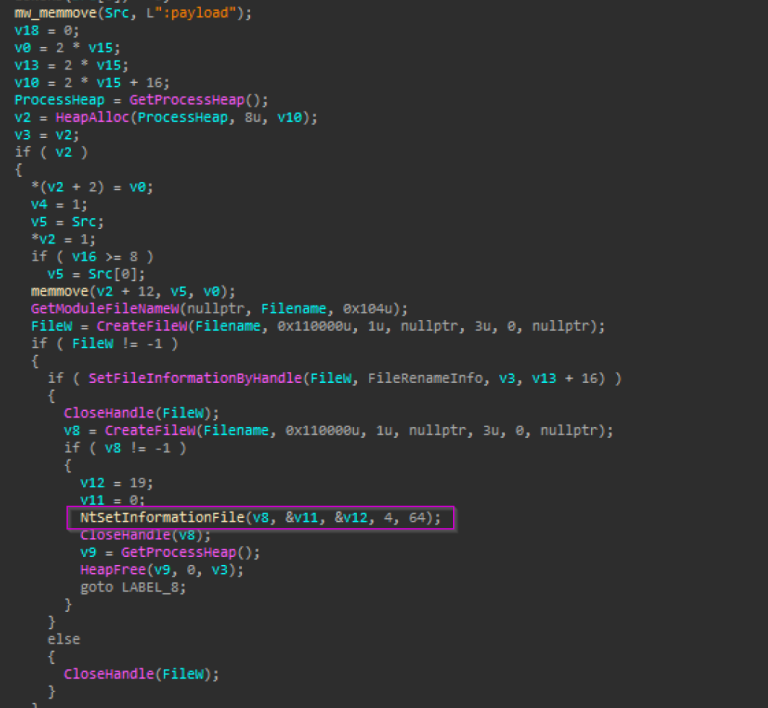
The sample performs a self-deletion setup before the encryption stage to reduce its on-disk visibility during execution. It retrieves its own executable path and renames itself to an NTFS alternate data stream by appending “:payload”, effectively hiding the file from standard directory listings. It then marks the file as delete-pending using the native API NtSetInformationFile, ensuring it will be removed once all handles are closed. By doing this early, the malware minimizes the chances of being detected or recovered during its encryption activity.
Encryption Routine
Cryptographic Initialization
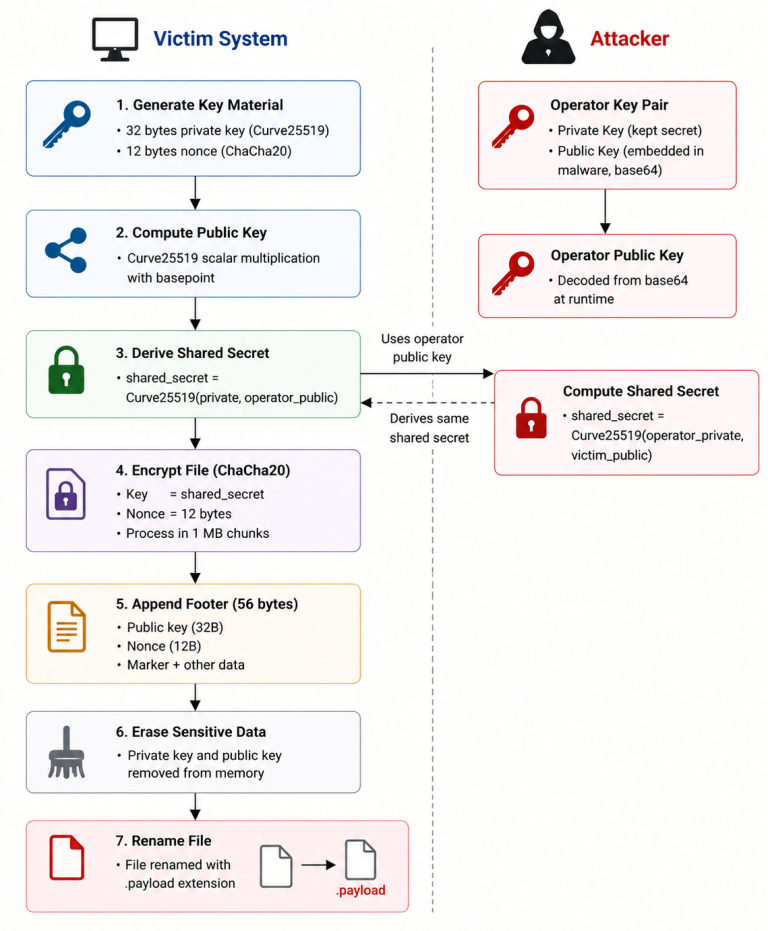
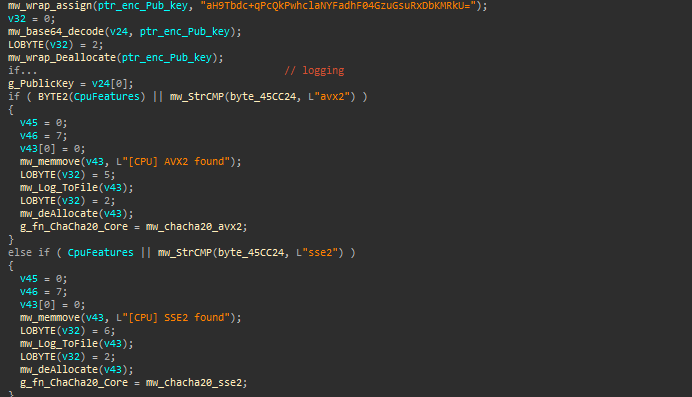
Before initiating file encryption, the malware sets up its cryptographic environment. It contains a hardcoded public key inside the binary, stored as a Base64 string.
For file encryption, payload uses ChaCha20, which is a fast symmetric encryption algorithm. To improve performance, it checks the CPU features of the system. If the CPU supports AVX2, a CPU instruction set that processes more data in parallel using 256-bit registers, making it faster for heavy operations, or SSE2, an older instruction set that uses 128-bit registers and provides a lower level of acceleration compared to AVX2, it uses an optimized version of ChaCha20. If neither is available, the malware falls back to a basic version of ChaCha20. This allows the encryption to run efficiently across different machines.
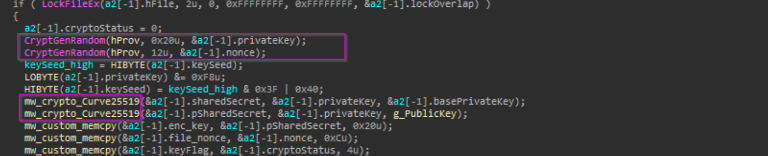
During file processing, a fresh per-file key is generated using secure randomness (CryptGenRandom), producing both a 32-byte private key and a 12-byte ChaCha20 nonce. This key is then used in a Curve25519 key exchange, deriving a shared secret with the embedded public key. The resulting value is used as the ChaCha20 encryption key, while the public component and nonce are later written to the file footer for decryption.
Target File Selection and Filtering
After initializing the cryptographic context, It determines its execution path based on argument . If a specific target path is provided , the ransomware skips system-wide discovery and directly inserts this path into its processing queue.
Otherwise, it enumerates all available drives , optionally excluding network shares depending on configuration.
It also applies multiple filtering rules based on the configuration to determine which files and directories should be excluded from processing. These exclusions are designed to avoid system instability and prevent self-damage .
Excluded File Extensions
Payload skips files associated with:
- Executables and libraries (.exe, .dll, .sys)
- Drivers and boot components (.drv, .efi)
- Scripts and administrative tools (.bat, .cmd, .ps1, .vbs, .js)
- Configuration and registry files (.ini, .inf, .reg, .xml)
- Logs and event records (.log, .evtx)
- Virtualization and disk images (.vhd, .vhdx, .wim)
- Fonts and UI resources (.ttf, .otf, .mui)
- Temporary and recovery-related files (.tmp, .blf, .regtrans-ms)
Excluded System Filenames
- Boot and Startup Configuration Files: autorun.inf, boot.ini, bootfont.bin, bootsect.bak, bootmgr, bootmgr.efi, bootmgfw.efi, ntldr, boot.sdi, config.sys, system.ini, win.ini, ntbootdd.sys, bootstat.dat
- System and User Profile Files: desktop.ini, ntuser.dat, ntuser.dat.log, ntuser.dat.log1, ntuser.dat.log2, ntuser.ini
- Cache and Index Files: thumbs.db, iconcache.db
- Memory Management and Virtual Memory Files: pagefile.sys, hiberfil.sys, swapfile.sys
- Recovery and Setup Configuration Files: recovery.ini, setup.ini
Excluded Directories :
- User and System Data: AppData, ProgramData, All Users
- Windows System Directories: Windows, windows.old, Boot
- Recycle and Recovery Locations: $Recycle.Bin, #recycle, $WinREAgent
- Browsers and Applications: Google, Opera, Opera Software, Mozilla, Mozilla Firefox, Internet Explorer, Tor Browser
- Development and Tools: .vs, WindowsPowerShell
File Encryption
Payload then builds a global queue of target files and processes them using multiple threads to speed up encryption. It detects the number of CPU cores and creates a thread pool of about twice (2X) that number, allowing heavy parallel execution.
Each thread continuously pulls a file path from the shared queue and encrypts them independently, which helps quickly spread encryption across the system without being limited by a single execution flow.
For each file, Payload opens it, reads the content into memory, encrypts it in fixed (1 MB) chunks using ChaCha20, and writes the encrypted data back to the same location. For large files , it applies a partial encryption strategy where only part of the file is processed (file size / 5), which speeds up execution while still rendering the file unusable.
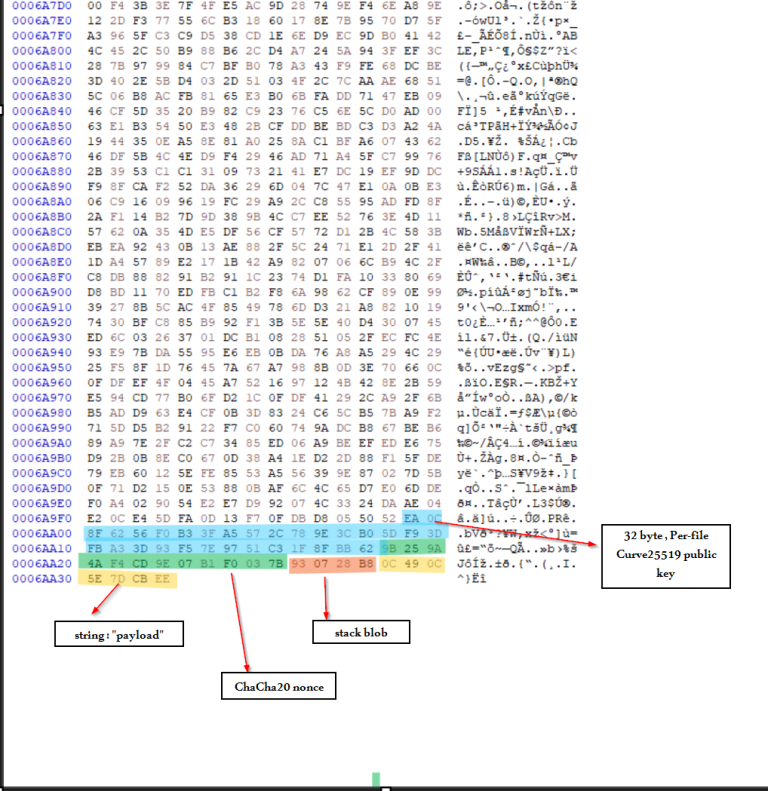
After encryption, It finalizes the file by appending a structured metadata footer and renaming the file with the extension .payload.
The footer is required for attacker-side decryption and contains : a per-file Curve25519 public key, the ChaCha20 nonce used during encryption, some unused or stack-residue bytes, and a static branding marker identifying the ransomware family. This footer is obfuscated using RC4 routine with the hardcoded key “FBI“.
Cleanup
Ransom Note
The decrypted ransom note :
					Welcome to Payload!

The next 72 hours will determine certain factors in the life of your company:
the publication of the file tree, which we have done safely and unnoticed by all of you,
and the publication of your company's full name on our luxurious blog.
NONE of this will happen if you contact us within this time frame and our negotiations are favorable.

We are giving you 240 hours to:
1. familiarize yourself with our terms and conditions,
2. begin negotiations with us,
3. and successfully conclude them.
The timer may be extended if we deem it necessary (only in the upward direction).
Once the timer expires, all your information will be posted on our blog.

ATTENTION!
Contacting authorities, recovery agencies, etc. WILL NOT HELP YOU!
At best, you will waste your money and lose some of your files, which they will carefully take to restore!
You should also NOT turn off, restart, or put your computer to sleep.
In the future, such mistakes can make the situation more expensive and the files will not be restored!
We DO NOT recommend doing anything with the files, as this will make it difficult to recover them later!

When contacting us:
you can request up to 3 files from the file tree,
you can request up to 3 encrypted files up to 15 megabytes
so that we can decrypt them and you understand that we can do it.

First, you should install Tor Browser:
1. Open: https://www.torproject.org/download
2. Choose your OS and select it
3. Run installer
4. Enjoy!

In countries where tor is prohibited, we recommend using bridges,
which you can take: https://bridges.torproject.org/

You can read:
http://payloadrz5yw227brtbvdqpnlhq3rdcdekdnn3rgucbcdeawq2v6vuyd.onion (Tor)

To start negotiations, go to http://payloadynyvabjacbun4uwhmxc7yvdzorycslzmnleguxjn7glahsvqd.onion and login:
User: hEg62n6K
Password: iuThQRYm5D6HRSF4

Your ID to verify: 1Q6NsTqfT023CTcDSFCt4oyCNKOyochF
Indicators of Compromise
| IOC Type | Value |
|---|---|
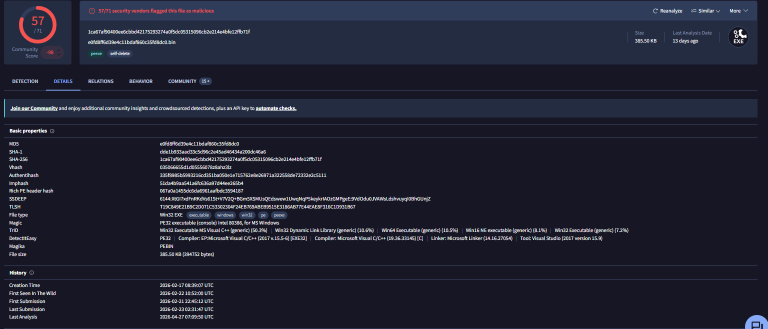
| Windows Variant Hash | 1ca67af90400ee6cbbd42175293274a0f5dc05315096cb2e214e4bfe12ffb71f |
| Linux Variant Hash | bed8d1752a12e5681412efbb8283910857f7c5c431c2d73f9bbc5b379047a316 |
| Mutex | MakeAmericaGreatAgain |
| Log File | C:\payload.log |
| Ransom Note | C:\RECOVER_payload.txt |
| Ransomware Infrastructure (Tor-based) |
payloadynyvabjacbun4uwhmxc7yvdzorycslzmnleguxjn7glahsvqd[.]onion payloadrz5yw227brtbvdqpnlhq3rdcdekdnn3rgucbcdeawq2v6vuyd[.]onion |
Linux variant
The Windows and Linux variants are similar in their core ransomware design, especially in their cryptographic scheme and overall execution model, while differing mainly in platform-specific implementation and operational tooling.
The Linux binary is a lightweight (~39 KB) stripped ELF specifically engineered for VMware ESXi infrastructure. It leverages libxml2.so.2 to parse /etc/vmware/hostd/vmInventory.xml , allowing it to enumerate virtual machine disk paths and encrypt hosted workloads directly.
In contrast to the Windows variant, which includes extensive anti-recovery and anti-forensics capabilities such as shadow copy deletion, service termination, event log wiping, and optional self-deletion, the Linux/ESXi version is significantly more minimal and focused purely on encryption efficiency in hypervisor environments.
Conclusion
Payload ransomware uses a hybrid encryption scheme combining Curve25519 for key exchange and ChaCha20 for fast file encryption. Each file is encrypted with a unique per-file key, and a footer is appended containing the data required for decryption. This footer is obfuscated using RC4 with a static key.
The sample is highly configurable through command-line arguments, allowing operators to control targeting, disable recovery mechanisms, and enable anti-forensic actions.
Overall, Payload operates as an offline ransomware, as all encryption, key generation, and file processing are performed locally on the victim machine. It does not use a C2 server for key exchange or data exfiltration.
References
- https://www.ransomware.live/group/payload
- https://www.watchguard.com/wgrd-security-hub/ransomware-tracker/payload